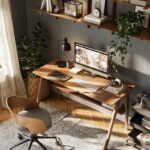
Complete Home Office Setup Guide for Under $1,000
Creating a home office doesn’t have to mean spending thousands of dollars or filling a room with complicated equipment. After more than 10 years of working remotely—across apartments, shared spaces, spare bedrooms, and small corners carved out of busy homes—I’ve learned this:
You don’t need more.
You need intentional.
This guide walks you through building a comfortable, focused, and highly functional home office for under $1,000—without sacrificing ergonomics, aesthetics, or productivity.
No hustle culture.
No unnecessary tech.
Just practical solutions that actually improve your workday.
Step 1: Start With the Right Desk (Budget: $150–$300)
Your desk is the foundation of your workspace. It doesn’t need to be expensive—but it does need to be stable, appropriately sized, and suited to your space.
What to Look For:
At least 40–48 inches wide for comfortable laptop + monitor setup
28–30 inches tall (standard ergonomic height)
Solid construction (no wobble)
Minimal drawers if you want a clean aesthetic
If you’re in a small apartment or shared space, a compact writing desk works beautifully. If you have more room, a simple rectangular desk gives flexibility for adding a second monitor later.
Pro Tip from 10 Years Remote:
Avoid oversized executive desks. They encourage clutter and take up more mental space than you realize.
Estimated Budget: $200
Step 2: Invest in Your Chair (Budget: $250–$400)
If there’s one place not to cut corners, it’s your chair.
Back pain is distracting. Shoulder tension drains focus. A supportive chair quietly improves everything.
Key Features to Prioritize:
Adjustable seat height
Lumbar support (built-in or adjustable)
Breathable material (mesh or fabric)
Armrests (optional but helpful for long days)
You do not need a $1,500 designer chair. There are excellent ergonomic options in the $300 range that provide real support.
Personal Insight:
When I upgraded from a basic dining chair to a proper ergonomic chair, my afternoon fatigue noticeably decreased. I didn’t realize how much energy I was spending just trying to sit comfortably.
Estimated Budget: $350
Step 3: Upgrade Your Monitor Setup (Budget: $150–$250)
If you work from a laptop full time, adding a monitor is one of the fastest ways to improve productivity and reduce neck strain.
Why It Matters:
Raises your screen to eye level
Reduces forward head posture
Makes multitasking easier
Prevents constant tab switching
A 24–27 inch monitor is the sweet spot for most remote workers. You don’t need ultra-high-end specs unless you’re doing graphic design or video editing.
Pair it with:
A simple monitor stand or riser
An external keyboard and mouse
Estimated Budget:
Monitor: $180
Keyboard + Mouse: $70
Total: $250
Step 4: Lighting Changes Everything (Budget: $50–$120)
Lighting is often overlooked, but it dramatically affects mood and focus.
Natural light is ideal. If that’s not possible, create layered lighting.
Ideal Setup:
One desk lamp with warm but bright light
Overhead ambient lighting
Optional floor lamp if the room feels dim
Avoid harsh blue-toned lighting. It creates visual fatigue over long workdays.
What I’ve Learned:
Good lighting makes a small space feel intentional instead of temporary.
Estimated Budget: $80
Step 5: Simple Organization That Prevents Clutter (Budget: $50–$100)
You don’t need elaborate storage systems. You need just enough structure to keep surfaces clear.
Focus On:
A cable management box or clips
One desk drawer organizer
A vertical file holder
Small shelf (if floor space allows)
Clutter isn’t just visual—it’s cognitive. The fewer visual distractions on your desk, the easier it is to focus deeply.
Estimated Budget: $75
Step 6: Comfort & Well-Being Additions (Budget: $50–$100)
Small upgrades can make your workspace feel calm instead of clinical.
Consider:
A supportive seat cushion (if needed)
A neutral desk mat
A footrest
A small plant
A framed print that feels grounding
This isn’t about aesthetics for social media. It’s about creating a space you want to sit in for 6–8 hours a day.
Estimated Budget: $75
Sample Budget Breakdown (Under $1,000)
Desk: $200
Ergonomic Chair: $350
Monitor + Accessories: $250
Lighting: $80
Organization: $75
Comfort Additions: $75
Estimated Total: $1,030
With modest adjustments (sales, bundles, or choosing a slightly lower-cost chair), staying under $1,000 is completely realistic.
Where to Save vs. Where to Spend
After a decade of remote work, here’s my honest breakdown:
Spend More On:
Chair
Monitor quality
Stability of your desk
Save On:
Decorative accessories
Trendy storage systems
Premium brand name items
A focused workspace doesn’t require designer labels. It requires thoughtful choices.
Small Space? Here’s How to Adjust
If you’re working from:
A bedroom corner
A dining room
A shared office
A studio apartment
Prioritize vertical space.
Add:
Wall-mounted shelves
Slim desks (under 24 inches deep)
Compact ergonomic chairs
Under-desk storage
I worked from a 650-square-foot apartment for three years. The key wasn’t expanding the space—it was reducing visual noise.
Minimal setup. Clear desk. Intentional storage.
Productivity Without Overcomplication
You don’t need:
Multiple monitors
Standing desks (unless you love them)
Complicated cable systems
High-end productivity gadgets
Most remote work productivity comes from:
Proper posture
Reduced distractions
Comfortable seating
Clear visual environment
Comfort supports focus.
Focus supports output.
What $1,000 Really Buys You
It buys:
Physical comfort
Fewer distractions
Better posture
A calmer environment
Sustainable workdays
It does not buy motivation or discipline—but it removes friction.
And friction is often the hidden cost of working from home.
How to Approach Purchases Thoughtfully
Before buying anything, ask:
Will this reduce discomfort?
Will this reduce clutter?
Will this make daily tasks easier?
Will this still feel useful one year from now?
If the answer is yes, it’s likely a good investment.
If it’s trendy, aesthetic-only, or solves a problem you don’t actually have… pause.
Building Your Workspace Over Time
You don’t have to buy everything at once.
In fact, I recommend this order:
Chair
Desk
Monitor
Lighting
Organization
Comfort upgrades
Build gradually. Notice what actually improves your workday.
Your setup should evolve with your work, not overwhelm it.
Final Thoughts: Design for Longevity, Not Hype
After 10+ years working remotely, here’s what I know:
The best home office isn’t the most aesthetic.
It’s the one that quietly supports your life.
You don’t need a perfectly styled Instagram setup.
You need comfort.
Clarity.
Focus.
With intentional choices, $1,000 is more than enough to create a workspace that feels calm, professional, and built for the long haul.
If you’re ready to build a workspace that supports how you actually work—not how social media says you should—explore curated home office solutions designed for real remote life.
Simple. Practical. Sustainable.
That’s what lasts.
Affiliate Disclosure
Some of the links on this site are affiliate links. This means that if you click through and make a purchase, I may earn a small commission—at no additional cost to you. These commissions help support the research and time that go into curating thoughtful, well-designed solutions for remote work. I only recommend products I genuinely believe are useful and would use in my own workspace.

Christine Shepherd is a remote and hybrid work veteran with over 14 years of experience building functional, design-forward home office spaces. As a digital marketing professional with a keen eye for usability and trends, she shares practical workspace solutions that balance comfort, productivity, and smart value.
View All Articles